Split-screen on PC
Need for Speed: Shift
Up to 4 players on one PC, with controllers.
Handler “Need for Speed Shift” by Perserveruz, version 3
What works
With Nucleus Co-op, up to 4 players can play Need for Speed: Shift together on one PC, each in their own part of the screen, with controllers. The free community handler “Need for Speed Shift” by Perserveruz does the setup and was checked by hub moderators: version 3, updated . Need for Speed: Shift is a racing and simulation game from 2009.
- Players4
- ControllersSupported
- Keyboard and mouseNot supported
- Several keyboards and miceNot supported
- Hub moderatorsVerified
How to play Need for Speed: Shift split screen on PC
Get Nucleus Co-op
Download Nucleus Co-op, free for Windows 10 and 11, and unzip it into its own folder, for example C:\NucleusCo-op. There is no installer.
Keep it out of Program Files, your user folder and OneDrive.
Install the Need for Speed: Shift handler
In Nucleus Co-op, search the Hub for Need for Speed: Shift and install its handler, or download the handler file from this page and drop it on the Nucleus window. Then show Nucleus where Need for Speed: Shift is installed.
Take a seat
Each player presses a button on their own controller to join and takes a spot on the screen. Pick a layout that fits your players.
Launch and connect
Press Launch: Nucleus opens one copy of Need for Speed: Shift per player and lays the windows out on your screen. Then link them in game, usually one player hosts a LAN or online session and the others join it. The handler notes say how.
What you need
- A Windows 10 or 11 PC
Nucleus Co-op runs on Windows only. System requirements
- Need for Speed: Shift for Windows
Installed on that PC. Nucleus starts every player's window from that one install.
- Nucleus Co-op, free
With .NET Framework 4.7.2 or later and the Visual C++ 2015–2022 runtimes (x86 and x64). Download
- Something to play with
One controller per player: Xbox, PlayStation or generic pads. Controllers
- A PC that can run 4 copies
Each player runs their own copy of Need for Speed: Shift, so the PC carries several times the usual load. Lower the graphics settings if it struggles. Performance tips
- A multiplayer mode
Nucleus links the windows through the game's own LAN or online mode; the handler takes care of it.
Handler notes
This handler allows you play up to 4 players split screen and over LAN with everything unlocked. Make sure you have the latest version of the game 1.0.2.0. In case you get a PhysXLoader.dll missing prompt, then you will need the install the PhysX installer located in the game's PhysX folder.
The game has been taken down from Steam but can easily be found on several abandonware websites. To quickly quit all instances, alt+tab to another window, press window key, right click on Nucleus Coop, select close. Unfortunately ctrl+q shortcut does not work on this game. Lastly, your window settings may reset to default when launching NFS Shift, so would recommend to save your window background theme as this will prevent it from being reset.
Massive credit goes to happyexpress for fixing the connection issue in split screen, without his help this handler would not have materialize.
About Need for Speed: Shift
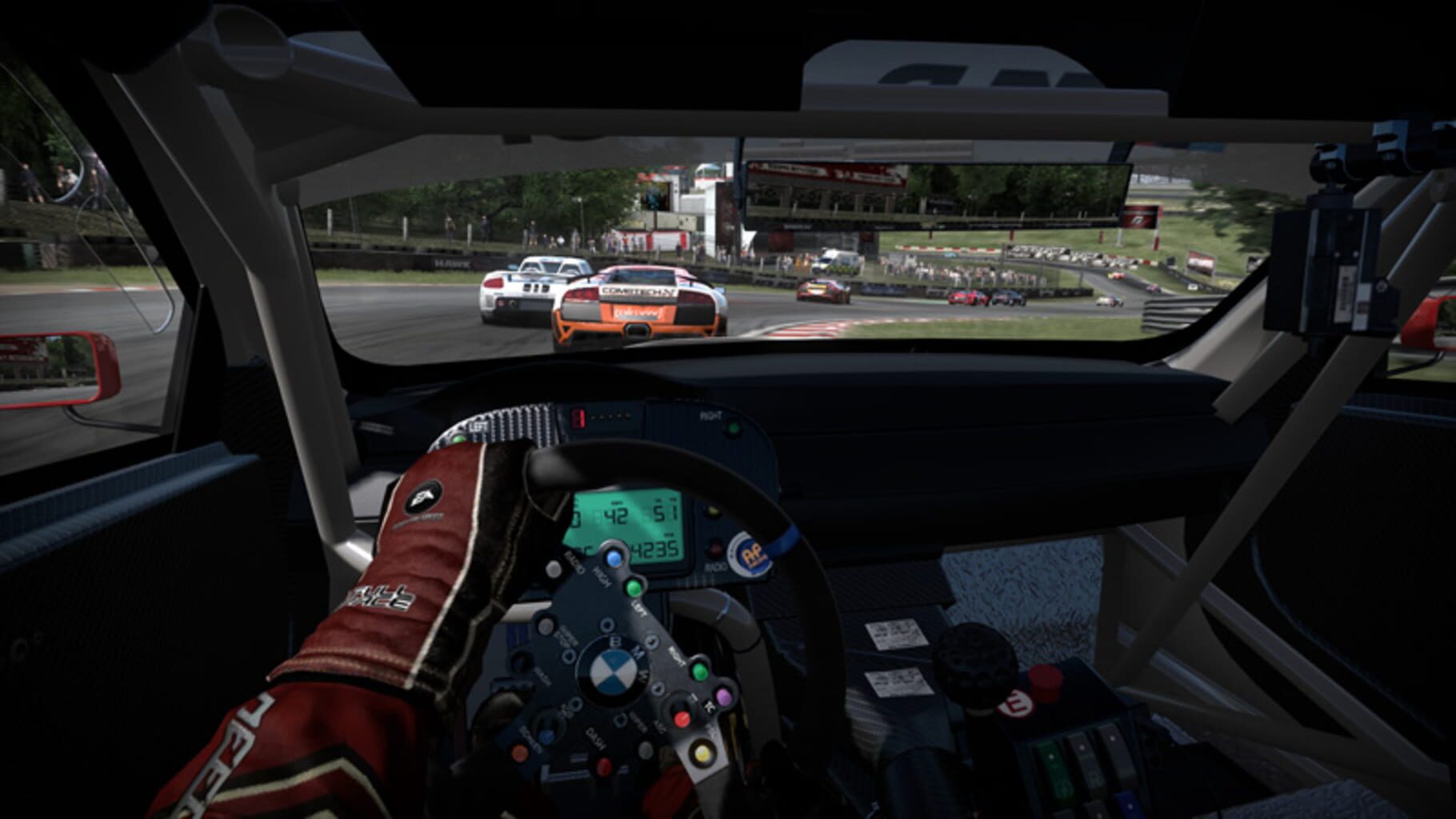
Need for Speed SHIFT is an award-winning authentic racing game that combines the true driver’s experience with real-world physics, pixel-perfect car models, and a wide range of authentic race tracks. Need for Speed SHIFT takes players in a different direction to create a simulation experience that replicates the true feeling of driving high-end performance cars. Players are thrust into the loud, visceral, intense, athletic experience of racing a car on the edge of control from the driver’s perspective through the combination of perception based G-forces, the hyper reality of the cockpit view, and the brutal experience of a first person crash dynamic. Need for Speed SHIFT features an accurate, accessible physics-based driving model that allows you to feel every impact, every change of track surface and every last bit of grip as you push yourself to the edge.
Summary from IGDB
Need for Speed: Shift screenshots




Version history
- v3Current
Fixed save settings
- v2
Removed intro videos. Fixed players names not appearing in multiplayer matches.
- v1
Need for Speed Shift - first handler release
Comments 0
No comments yet. Played it? Share what worked for your group.
Play these next
Browse all games
MudRunner
Talos919.5k downloads4
Spintires
Talos915.5k downloads4
DiRT Rally
Genjuro_Kibagami1.4k downloads4
GRID: Autosport
Perserveruz942 downloads4
Grid 2
Perserveruz2k downloads4
Slackers: Carts of Glory
Zensuu488 downloads4
Browse by genre: Racing · Simulation
Log in or create an account to comment.